Ask in natural language
Describe the business question you want to investigate instead of writing every analysis step yourself.
Apollo Smart BI helps business users explore data using natural-language questions, generate visual insights and move from a question to a clearer answer—without starting every analysis from scratch. Get started directly, or talk to us about an enterprise solution.
An AI-powered business intelligence product by Athenadataflo. Already have an account? Log in
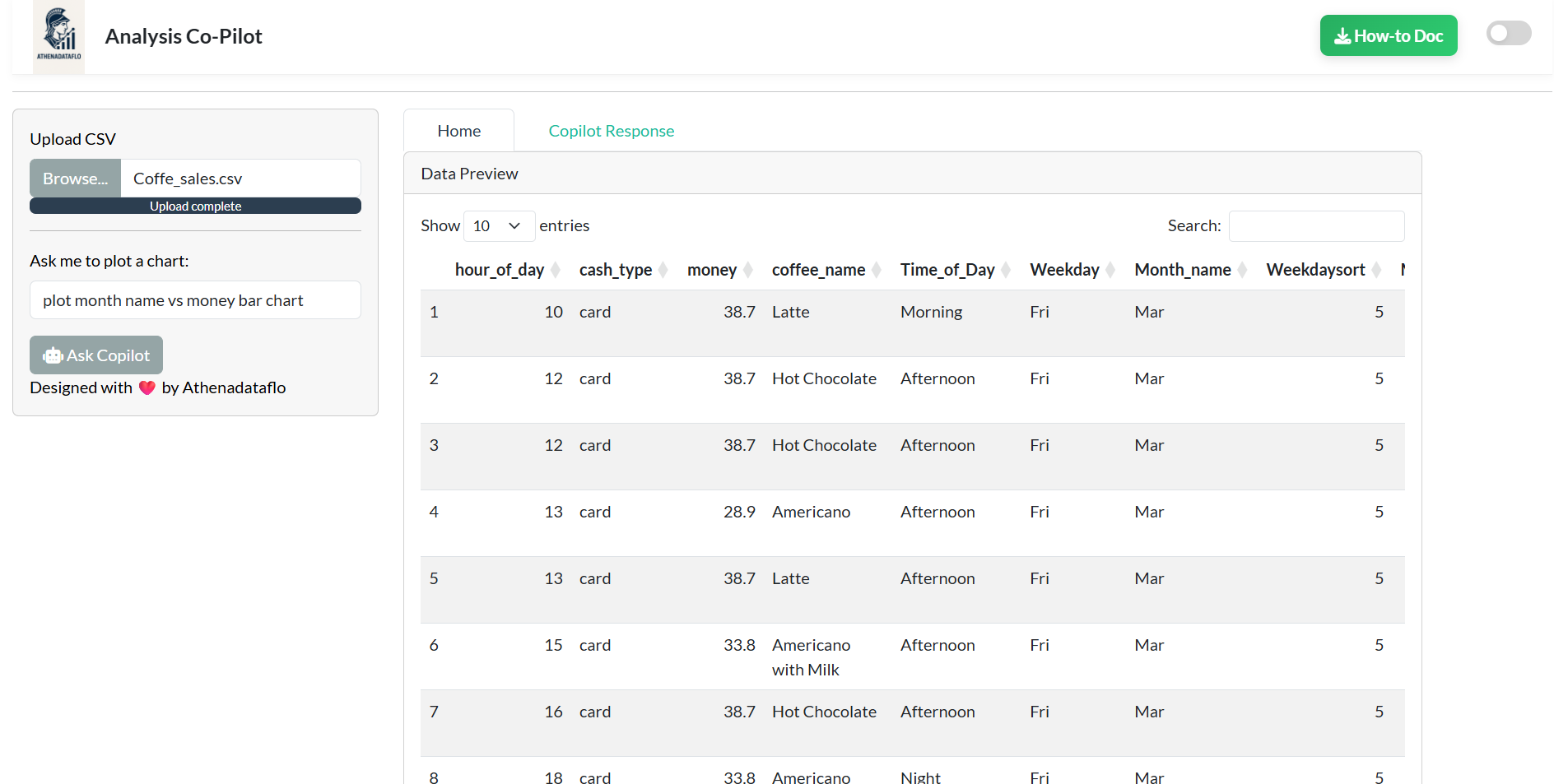
Apollo Smart BI interface preview.
Apollo Smart BI brings data exploration and AI-assisted analysis into a single workflow, helping teams get to useful answers with fewer manual steps.
Describe the business question you want to investigate instead of writing every analysis step yourself.
Turn analytical responses into visual outputs and tabular views that make patterns easier to inspect.
Review the generated output and continue refining the analysis to get closer to the question you need answered.
Adjust chart presentation, including titles, descriptions, chart types and selected formatting options.
Inspect the data behind an analysis and export the relevant chart data for further use.
Bring analytical outputs into a broader reporting and presentation workflow.
Give your team a more approachable way to explore information and build an analysis around the questions that matter.
Start with a supported dataset, such as an Excel file, in your Apollo workspace.
Describe the metric, comparison or trend you want to understand in everyday language.
Explore the generated chart or table and inspect the analytical output.
Adjust the visualization and take relevant outputs into your reporting workflow.
Traditional BI workflows can involve multiple steps between having a question and producing an analysis. Apollo Smart BI is designed to make that first step more conversational and approachable.
Start with a quick introduction to the product, then follow a full walkthrough of the analysis workflow.
Examples of the types of questions business teams may explore, depending on the structure and quality of their data.
Compare sales across regions, products, teams or time periods.
Explore trends, changes and key metrics in operational datasets.
Investigate customer groups, purchasing patterns and segment-level results.
Create visual summaries that support reviews and business conversations.
These are illustrative use cases, not claims of preconfigured modules or guaranteed analytical outcomes.
Talk to Athenadataflo about enterprise requirements, deployment considerations, collaboration and a tailored walkthrough.
Tell us about your organisation, your analytics requirements and what you would like to explore. Our team will contact you to discuss an enterprise-focused walkthrough.
Looking to use Apollo directly? Start using Apollo →
Prefer to talk directly? Email admin@athenadataflo.com or call +91 70324 49621.